
- Core reality: Recruiters filter before they read, and your Skills list is a major ranking input, so missing target skills can make you invisible.
- Standardization rule: Use LinkedIn auto-suggested skill names, because creative labels break the recruiter search match.
- Hard vs soft balance: Hard skills drive search visibility, soft skills support trust, so pin the top 3 hard-skill keywords first.
- 30-minute audit: Pull skills from 5-10 target job posts, fix gaps, remove dead weight, fill all 50 slots, then reorder and validate with skill badges when available.
- Mistakes to avoid: Keyword stuffing, irrelevant or outdated skills, and “ghost skills” you cannot defend in a real interview.
The Invisible Filter: Why Your LinkedIn Skills Dictate Your Career Visibility
There is a harsh reality in modern recruitment that most job seekers ignore: recruiters do not read profiles initially; they filter them. Before a human eye ever scans your carefully crafted summary or reviews your work history, your profile must pass through a digital gatekeeper – the LinkedIn Recruiter algorithm.
Understanding the top LinkedIn skills recruiters search for is not just about profile optimization; it is about survival in a saturated talent market. The “Skills” section on LinkedIn functions as a massive metadata repository. When a recruiter types “Project Management” into their backend tool, the algorithm prioritizes candidates who have this specific tag in their Skills section over those who merely mention it in a paragraph.
This distinction is critical. You might be a world-class Python developer, but if “Python” is missing from your structured skill list, you are effectively invisible to the initial search filter. This guide goes beyond basic lists. We will dissect the strategy behind skill selection, the hierarchy of “hard” versus “soft” skills, and the exact mechanics of how to position yourself to appear in the top 10 search results for your target role.
How the LinkedIn Recruiter Algorithm Actually Works

To master your profile, you must think like the software that evaluates you. LinkedIn Recruiter uses a “relevance score” to rank candidates. While many factors contribute to this score, the Skills & Endorsements section is weighted heavily because it provides structured data that is easy for the algorithm to categorize.
When a recruiter opens a requisition for a “Marketing Manager,” the platform suggests a cluster of associated skills (e.g., SEO, Content Strategy, Google Analytics). If your profile matches these specific tags, you move up the ranking. If you have used a creative but non-standard term – like “Web Wizardry” instead of “Web Development” – you lose that algorithmic match.
Expert Insight: “Standardization is your friend. Creativity in job titles and skill names often leads to obscurity. Always use the auto-suggested skill names provided by LinkedIn, as these map directly to the recruiter’s search filters.”
The Top 100 Skills on LinkedIn: A Categorized Deep Dive
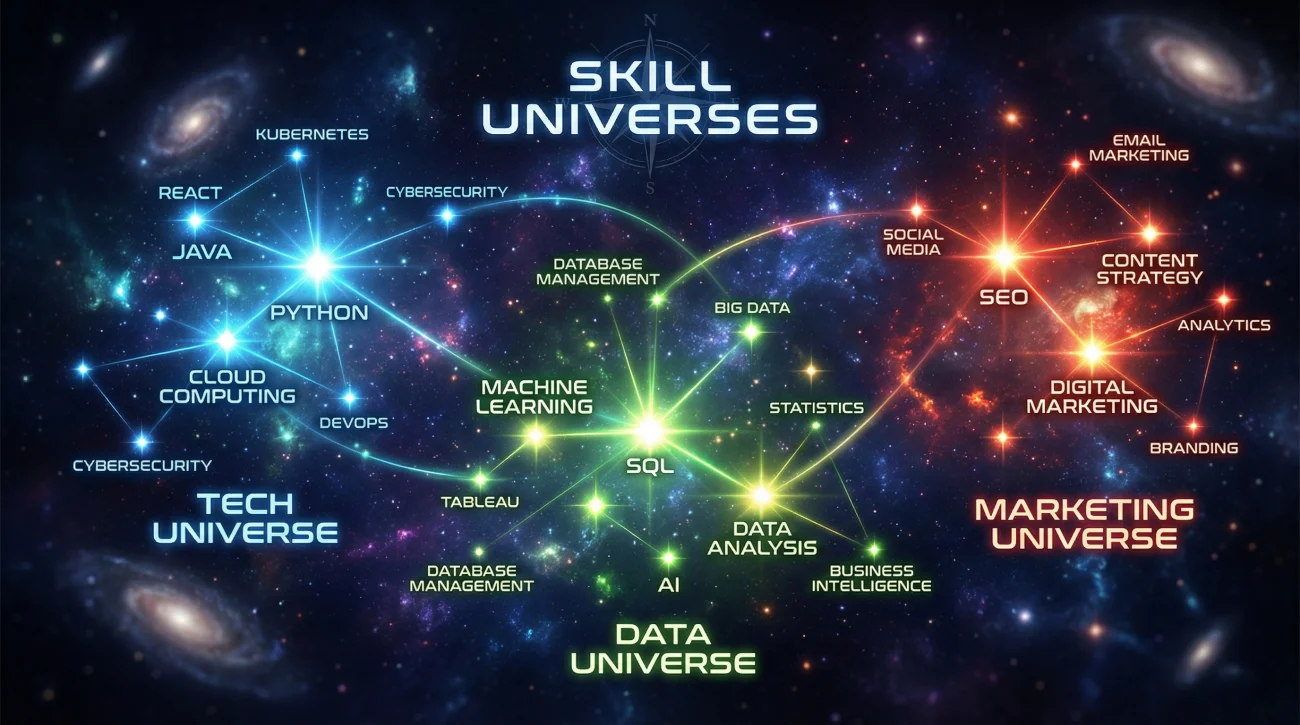
We have analyzed data across millions of profiles and job descriptions to curate the top 100 skills on LinkedIn that drive actual recruitment activity. Unlike generic lists, this breakdown categorizes skills by their functional utility and search volume.
1️⃣ Technology & Engineering (The High-Volume Drivers)
1. Technology & Engineering (The High-Volume Drivers)
In the tech sector, specificity is king. Recruiters rarely search for “Programming”; they search for the specific language or framework. The hierarchy here usually follows the TIOBE index and current enterprise adoption trends.
Core Languages & Backend:
- 1. Python (Dominant in Data Science & Backend)
- 2. Java (Enterprise standard)
- 3. SQL (Universal data language)
- 4. JavaScript (Web standard)
- 5. C# / .NET
- 6. C++
- 7. Go (Golang)
- 8. TypeScript
- 9. Ruby
- 10. PHP
Cloud Infrastructure & DevOps:
- 11. Amazon Web Services (AWS)
- 12. Microsoft Azure
- 13. Google Cloud Platform (GCP)
- 14. Docker
- 15. Kubernetes
- 16. Linux
- 17. CI/CD (Continuous Integration/Continuous Deployment)
- 18. Terraform
Frontend & Frameworks:
- 19. React.js
- 20. Node.js
- 21. Angular
- 22. Git (Version Control)
2️⃣ Data & Analytics (The New Corporate Currency)
2. Data & Analytics (The New Corporate Currency)
Data skills are no longer limited to data scientists. Marketing managers, financial analysts, and operations leads are now expected to possess data literacy. This crossover makes these skills incredibly valuable for hybrid roles.
- 23. Data Analysis
- 24. Microsoft Excel (Advanced: Macros, VBA)
- 25. Power BI
- 26. Tableau
- 27. Machine Learning
- 28. Artificial Intelligence (AI)
- 29. Statistical Modeling
- 30. Big Data Analytics
- 31. Apache Spark
- 32. Hadoop
- 33. Data Visualization
- 34. ETL Processes
- 35. Google Analytics
- 36. R Programming
- 37. SAS
3️⃣ Business Strategy & Finance
3. Business Strategy & Finance
For non-technical roles, the focus shifts to operational efficiency and financial stewardship. These skills demonstrate that you understand how a business generates and sustains revenue.
- 38. Project Management
- 39. Strategic Planning
- 40. Business Development
- 41. Account Management
- 42. Financial Modeling
- 43. Budget Management
- 44. Forecasting
- 45. Accounting (GAAP/IFRS)
- 46. Mergers & Acquisitions (M&A)
- 47. Risk Management
- 48. Business Process Improvement
- 49. Management Consulting
- 50. Corporate Finance
4️⃣ Marketing & Growth
4. Marketing & Growth
The marketing landscape has shifted entirely to digital. Traditional marketing skills are being replaced by technical marketing skills that focus on attribution, automation, and funnel optimization.
- 51. Digital Marketing
- 52. Social Media Marketing
- 53. Search Engine Optimization (SEO)
- 54. Content Strategy
- 55. Email Marketing
- 56. Marketing Automation
- 57. Lead Generation
- 58. Salesforce / CRM Management
- 59. HubSpot
- 60. Pay-Per-Click (PPC)
- 61. Copywriting
- 62. Brand Management
- 63. Market Research
- 64. Public Relations
- 65. Growth Hacking
5️⃣ Design & User Experience
5. Design & User Experience
As product-led growth becomes the norm, the ability to design intuitive interfaces is highly prized. Note that tool proficiency (Figma, Adobe) is just as important here as the theoretical skill (UX Design).
- 66. User Experience (UX) Design
- 67. User Interface (UI) Design
- 68. Graphic Design
- 69. Adobe Creative Suite (Photoshop, Illustrator, InDesign)
- 70. Figma
- 71. Sketch
- 72. Video Editing (Premiere Pro, After Effects)
- 73. Motion Graphics
- 74. Product Design
- 75. Web Design
6️⃣ Operational Methodologies
6. Operational Methodologies
These are the frameworks that govern how work gets done. Certifications in these areas are often mandatory for senior project management roles.
- 76. Agile Methodologies
- 77. Scrum
- 78. Kanban
- 79. Six Sigma / Lean Six Sigma
- 80. Supply Chain Management
- 81. Logistics
- 82. Operations Management
- 83. Vendor Management
- 84. Quality Assurance (QA)
- 85. Change Management
7️⃣ High-Value “Power” Skills (Soft Skills)
7. High-Value “Power” Skills (Soft Skills)
While technical skills get you found, soft skills get you hired. However, on LinkedIn, you must be careful not to dilute your profile with too many generics.
- 86. Leadership
- 87. Team Management
- 88. Strategic Thinking
- 89. Negotiation
- 90. Public Speaking
- 91. Cross-functional Collaboration
- 92. Problem Solving
- 93. Emotional Intelligence
- 94. Adaptability
- 95. Coaching & Mentoring
- 96. Conflict Resolution
- 97. Time Management
- 98. Stakeholder Management
- 99. Customer Service
- 100. Critical Thinking
Hard Skills vs. Soft Skills: The Optimization Dilemma

There is a constant debate about the balance between hard (technical) and soft (interpersonal) skills on a profile. From an SEO perspective, the answer is clear: Hard skills drive traffic; soft skills drive conversion.
Recruiters rarely search for “Good Communicator.” They search for “Salesforce” or “Financial Modeling.” However, once they land on your profile, they look for soft skills to assess culture fit and leadership potential. The table below outlines how to balance these two categories effectively.
| Feature | Hard Skills (Technical) | Soft Skills (Interpersonal) |
|---|---|---|
| Primary Function | Search visibility (SEO) and technical qualification. | Culture fit, leadership potential, and “hireability.” |
| Search Volume | ⭐⭐⭐⭐⭐ (Very High) | ⭐⭐ (Low to Medium) |
| Verification | Easy (Tests, Certifications, Portfolios). | Difficult (Requires interview or behavioral assessment). |
| Profile Placement | Top 3 pinned skills, Headline, Experience descriptions. | Summary section, Recommendations, lower tier of Skills list. |
| Example | Python, SEO, GAAP, Neuro-surgery. | Leadership, Empathy, Communication. |
Must-Have Skills for Specific Job Titles
To truly optimize your profile, you cannot rely on general lists. You must align your must-have skills for job title on LinkedIn with the specific expectations of your role. Below are the skill clusters for five high-demand professions.
1. Software Engineer
The modern engineer is expected to be “T-shaped” – deep expertise in one area (e.g., Backend) with broad knowledge across the stack (Cloud, DevOps).
- Must-Haves: [Language of choice], Git, SQL, Algorithms.
- Differentiators: AWS/Azure, Docker, Kubernetes, System Design.
- Methodology: Agile, Scrum, TDD (Test Driven Development).
2. Product Manager
Product management is the intersection of business, tech, and UX. Your skills must reflect this triad.
- Must-Haves: Product Strategy, Roadmap Development, User Research, Agile.
- Differentiators: SQL (for self-service analytics), A/B Testing, Go-to-Market Strategy.
- Tools: JIRA, Confluence, Amplitude/Mixpanel.
3. Marketing Manager
Marketing is now a technical discipline. If you only list “Creativity” and “Branding,” you will miss out on the higher-paying growth roles.
- Must-Haves: Digital Marketing, Social Media Marketing, Content Strategy, SEO.
- Differentiators: Marketing Automation (Marketo/HubSpot), Data Analysis, PPC.
- Tools: Google Analytics, SEMrush, Salesforce.
4. Financial Analyst
Finance professionals must demonstrate their ability to manipulate data and forecast the future with accuracy.
- Must-Haves: Financial Analysis, Financial Modeling, Advanced Excel, Forecasting.
- Differentiators: Python (for finance), SQL, Tableau, SAP.
- Certifications: CFA, CPA, FMVA.
5. B2B Sales Representative
Sales has moved beyond the “rolodex.” It is now about pipeline management and consultative selling.
- Must-Haves: B2B Sales, Account Management, Lead Generation, Cold Calling.
- Differentiators: Solution Selling, SaaS, Social Selling.
- Tools: Salesforce, HubSpot, Outreach.io, LinkedIn Sales Navigator.
The Billboard Effect: Keywords to Use in LinkedIn Headline
Your headline is the most valuable real estate on your profile. It travels with you everywhere – when you comment, when you apply for jobs, and when you appear in search results. Implementing the right keywords to use in LinkedIn headline strategy is crucial for click-through rates.
Many professionals make the mistake of using their headline solely for their job title (e.g., “Marketing Manager at Company X”). This is a wasted opportunity. You should treat your headline as a 220-character pitch that includes your core competencies.
Proven Headline Formulas for Searchability
To maximize both human readability and algorithmic visibility, use separators (like | or •) to break up concepts.
1️⃣ Formula 1: The Specialist (Best for experienced hires)
Formula 1: The Specialist (Best for experienced hires)[Current Title] | [Core Skill 1] | [Core Skill 2] | [Industry Authority]
Example:
“Senior Data Scientist | Machine Learning & NLP | Python Expert | FinTech”
2️⃣ Formula 2: The Value Proposition (Best for consultants/sales)
Formula 2: The Value Proposition (Best for consultants/sales)[Title] | Helping [Target Audience] achieve [Result] | [Top Hard Skill]
Example:
“B2B Sales Director | Helping SaaS Startups Scale to $10M ARR | Enterprise Software Sales”
3️⃣ Formula 3: The Hybrid (Best for generalists)
Formula 3: The Hybrid (Best for generalists)[Title] | [Specialization 1] + [Specialization 2] | [Certification]
Example:
“Project Manager | Agile & Scrum Master | PMP Certified | Risk Management”
For more inspiration on how to structure this critical text, you can browse our extensive library of LinkedIn headline examples across various industries.
The 30-Minute Skill Audit: A Step-by-Step Workflow

Don’t just guess which skills to add. Use this data-driven workflow to align your profile with market demand.
Step 1: The Job Description Scraper (10 Minutes)
Open 5-10 job descriptions for the role you want next (not the one you have now). Copy the “Requirements” section from each into a document. Highlight every hard skill mentioned. If “Python” appears in 8 out of 10 ads, it is a Tier 1 mandatory skill.
Step 2: The Gap Analysis (10 Minutes)
Compare your list from Step 1 with your current LinkedIn Skills section. Are you missing any Tier 1 skills? Are there skills on your profile that appeared in zero job descriptions (e.g., “Fax Machine Repair”)? Remove the dead weight to make room for the high-value terms.
Step 3: The Reordering (5 Minutes)
LinkedIn allows you to pin your top 3 skills. These are the ones visible before a user clicks “Show all.” Ensure your pinned skills are your absolute strongest keywords – usually the ones that define your profession (e.g., “Financial Analysis” for a CFO).
Step 4: The Validation (5 Minutes)
Check if LinkedIn offers a “Skill Assessment” badge for your technical skills. Taking these short quizzes and earning a badge verifies your proficiency to the algorithm and adds a layer of trust for recruiters.
The Truth About Endorsements: Quality vs. Quantity
Years ago, endorsements were a simple numbers game. Today, their value is more nuanced. While they still provide social proof, the algorithm has become smarter about who is endorsing you. An endorsement for “Java” from another senior developer carries significantly more weight than an endorsement from your aunt.
| Pros of Endorsements | Cons/Risks |
|---|---|
| ✅ Social Proof: High numbers (99+) signal authority to human visitors. | ❌ Dilution: Too many endorsements on irrelevant skills distract from your core competency. |
| ✅ Search Boost: Skills with endorsements rank slightly higher in search results. | ❌ Credibility Risk: Buying fake endorsements or swapping them with strangers looks suspicious. |
| ✅ Relevance: Endorsements from colleagues in the same industry validate your expertise. | ❌ Obsolescence: High endorsements on outdated tech (e.g., Flash) can make you look behind the times. |
Strategic Tip: Do not be afraid to delete an endorsement if it comes from a questionable account or is for a skill you no longer want to be hired for. You are curating a professional brand, not collecting stickers.
Critical Mistakes to Avoid in Your Skills Section
Even seasoned professionals fall into traps that hinder their profile’s performance. Avoid these common errors to maintain a pristine digital presence.
1. The “Keyword Stuffing” Trap
Do not list “Marketing,” “Digital Marketing,” “Online Marketing,” and “Internet Marketing” as separate skills if you are limited on space. While synonyms can help, it is better to prioritize distinct, high-value tools or methodologies (e.g., “SEO,” “PPC,” “Google Analytics”).
2. Ignoring the 50-Skill Limit
You have 50 slots. Use them. A profile with only 10 skills looks incomplete. If you are struggling to fill the slots, look at complementary soft skills or industry-specific knowledge (e.g., “Regulatory Compliance”).
3. Using “Ghost” Skills
Never list a skill you cannot back up in an interview. If you list “Advanced Excel” but cannot do a VLOOKUP or Pivot Table, you will fail the technical screen, damaging your reputation with that recruiter permanently.
For a deeper understanding of how these elements fit into your broader personal brand, refer to our comprehensive guide on optimizing your LinkedIn headline and profile strategy.
❓ FAQ
🔢 How many skills should I actually list on my profile?
🎯 Should I delete skills that are no longer relevant to my career?
⭐ Do LinkedIn Skill Assessments badges actually help with hiring?
🗣️ Is it better to list specific tools or general skills?
🔄 How often should I update my LinkedIn skills?
Final Thoughts: Curating a Future-Proof Profile
Your LinkedIn Skills section is not a historical record of everything you have ever done; it is a strategic roadmap of where you want to go. By aligning your skills with the top LinkedIn skills recruiters search for, you move from being a passive participant in the job market to an active, highly visible candidate.
Remember the golden rule of SEO: Relevance + Authority = Visibility. Choose skills that are relevant to your target role, build authority through endorsements and assessments, and structure them in a way that signals expertise to both the algorithm and the human eye.
Take the time today to audit your skills. Remove the clutter, prioritize the keywords that pay, and ensure your profile is working for you 24/7, even while you sleep.
If you’re serious about your job search, make sure you read a few more articles from the blog before you log off.